Lock Server/Client (PC Only Currently)
The Lock Server application simply supplies a password to the Lock Client that is associated with .cpt files. As long as the Lock Server is running and the correct password is supplied, you can just double click on a .cpt file and it will be automatically decrypted and opened.
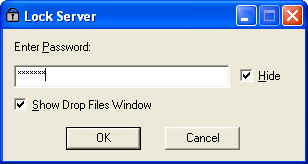
The Lock Server window looks like,
This dialog appears when the Lock Server is first run. The password is
entered and the dialog closes down (when "OK" is pressed). The icon... will
appear in the system tray (on Windows). This can be used to access the
dialog again to change the password or to Exit the server (which will stop
anybody opening the encrypted .cpt files).
will
appear in the system tray (on Windows). This can be used to access the
dialog again to change the password or to Exit the server (which will stop
anybody opening the encrypted .cpt files).
NOTE: The files are temporarily decrypted to the users specified temporary folder (usually this is automatic under Windows - just type %tmp% in an explorer window). A subfolder called "lockdir" is created. This folder is emptied whenever lockclient is run and when the Lock Server is closed down. HOWEVER, some naughty applications (particularly under Windows XP) seem to hold onto the file even after the app has finished with it. If this is the case, Lock Server should warn you that it cannot remove the files from the temporary folder BUT, Windows XP seems to have a new method of removing locked files. Sometimes, Windows pretends that the file is deleted but in reality it has been just marked as deleted until the file lock is removed. This means it will eventually be deleted but maybe not until a reboot! I am sorry about this but at the moment there is little I can do. For the majority of cases, the files are deleted okay as long as you exit the application that has a lock on the file before closing down the lock server (video files I am thinking of in particular here, for pictures this is not normally a problem).
The "Show Drop Files Window" option, if checked, will leave behind an "always on top" window that can be used to drop files into:
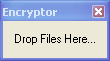
Non-archive mode files can be dragged into this window in order to be encrypted or decrypted (their status is toggled on a per file basis - so you can drag mixtures of encrypted and non-encrypted files into the window).